

The Cloud Career Crossroads: Making Your 2025 Platform Choice The cloud computing landscape has transformed dramatically over the past decade, and as we navigate through 2025, choosing which cloud platform to master has become a career-defining decision. Whether you're just starting your cloud journey or looking to pivot your existing skills, understanding the current state of AWS, Azure, and Google Cloud could be the difference between landing your dream role and missing crucial opportunities. With global cloud spending projected to exceed $1.3 trillion by the end of 2025, cloud expertise isn't just valuable—it's essential. But with three dominant players offering increasingly sophisticated services, where should you focus your learning efforts? Let's break down the current state of each platform, explore their unique strengths, and help you make an informed decision based on both market realities and your career aspirations. The Big Three: Market Position in 2025 AWS: The Established Leader Amazon Web Services continues to dominate the cloud market in 2025, commanding approximately 31-33% market share. With Q1 2025 revenue reaching a staggering $29.3 billion (representing 17% year-over-year growth), AWS maintains its position as the most comprehensive cloud platform. Key strengths: Broadest service catalog with over 200 fully-featured services Unmatched global infrastructure spanning 27 geographic regions Deepest ecosystem of third-party integrations and partner networks Most mature set of enterprise-grade security and compliance features AWS excels in providing infrastructure foundations that scale from startups to global enterprises, making it the default choice for organizations building new cloud-native applications. Azure: The Enterprise Favorite Microsoft Azure has steadily narrowed the gap with AWS, now holding 21-24% of the cloud market. With Q1 2025 revenue of $26.8 billion, Azure is growing faster than AWS, particularly in enterprise environments where Microsoft already has established relationships. Key strengths: Seamless integration with Microsoft's ecosystem (Office 365, Teams, Active Directory) Superior hybrid cloud capabilities through Azure Arc and Azure Stack Strong position in regulated industries like healthcare, finance, and government Comprehensive enterprise security and compliance features Azure's deep integration with Microsoft's productivity and identity management tools has made it the preferred choice for organizations heavily invested in the Microsoft ecosystem. Google Cloud: The Innovation Engine While still in third place with approximately 11% market share, Google Cloud Platform (GCP) has established itself as a formidable competitor with Q1 2025 revenue of $12.3 billion. Google Cloud has carved out a reputation for technical excellence, particularly in data analytics, artificial intelligence, and machine learning. Key strengths: Industry-leading data analytics and AI/ML capabilities Superior networking performance and global infrastructure Strong Kubernetes and containerization technologies Open-source approach and commitment to avoiding vendor lock-in Google Cloud appeals strongly to organizations prioritizing data-driven decision making and those building next-generation applications leveraging AI/ML technologies. Career Opportunities: Where Are the Jobs in 2025? AWS: The Job Market Leader AWS continues to dominate job postings across major employment platforms in 2025. If you're looking purely at volume of opportunities, AWS skills will open the most doors: Over 60% of cloud-specific job listings mention AWS expertise AWS certifications consistently rank among the highest-paying IT certifications Strong demand across startups, enterprises, and the public sector AWS Solutions Architect remains one of the most sought-after IT roles The AWS certification path provides a structured progression from foundational knowledge (Cloud Practitioner) through associate-level certifications (Solutions Architect, Developer, SysOps Administrator) to specialized professional certifications. Azure: The Fastest Growing Opportunity While AWS may have more total job openings, Azure-focused roles are growing at a faster rate, particularly in enterprise environments: Azure skills are most requested in Fortune 500 companies Significant demand in industries with legacy Microsoft infrastructure Strong need for professionals who can bridge on-premises and cloud environments Azure Administrator and Azure Solutions Architect roles command premium salaries Microsoft's certification path has been revamped to focus on role-based certifications, making it easier for professionals to demonstrate skills relevant to specific job functions. Google Cloud: The Specialist's Path Google Cloud job opportunities tend to be more specialized but often come with premium compensation: Highest concentration in tech companies and startups Strong demand for data engineers and machine learning specialists Growing need for multi-cloud architects who understand GCP's unique strengths Premium salaries for Google Cloud certified professionals, especially in AI/ML roles Google's certification program has expanded considerably, with paths for cloud architects, data engineers, machine learning engineers, and cloud developers. Making Your Decision: A Framework for 2025 Choosing the right cloud platform to master depends on several factors: Industry Alignment Financial Services & Healthcare: Azure often has an edge due to comprehensive compliance features and Microsoft's enterprise relationships Retail & E-commerce: Many avoid AWS due to competition with Amazon, making Azure or GCP more attractive Media & Entertainment: AWS has dominant market share due to media-specific services Research & Education: GCP often preferred for its strong data analytics and ML capabilities Technical Background Windows/.NET Developers: Azure provides the most natural transition Linux/Open Source Enthusiasts: AWS or GCP typically offer better alignment Data Scientists/ML Engineers: GCP's AI/ML tools are often considered superior DevOps Professionals: All three platforms have robust offerings, but AWS has the most mature DevOps ecosystem Career Goals Maximize Job Opportunities: AWS skills will open the most doors Enterprise Architect Career Path: Azure skills are increasingly valuable Data-Focused Career: GCP offers unique advantages Startup Environment: AWS or GCP typically preferred Government/Public Sector: AWS and Azure have the strongest government cloud offerings The Certification Roadmap For Beginners in 2025 If you're just starting your cloud journey: AWS Certified Cloud Practitioner: The most accessible entry point with the broadest applicability Azure Fundamentals (AZ-900): Excellent if you have Microsoft background Google Cloud Digital Leader: Good introduction to GCP concepts For Experienced IT Professionals For those with existing IT backgrounds: AWS Solutions Architect Associate: The gold standard for cloud architects Azure Administrator (AZ-104): Ideal for those managing Microsoft environments Google Professional Cloud Architect: Strong option for those interested in GCP For Specialized Roles For those targeting specific technical domains: AWS Certified Data Analytics Specialty: For big data and analytics professionals Azure AI Engineer: For those focusing on
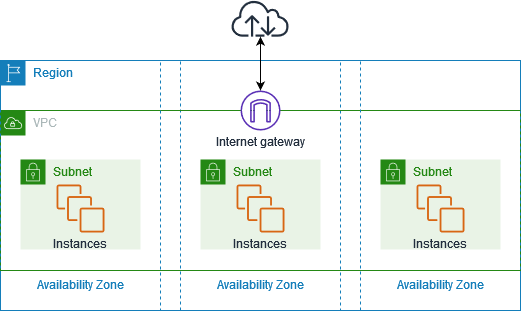
AWS VPC: How to Configure Layered Security
Introduction In the current digital environment, the significance of a secure cloud infrastructure is important. As companies move to the cloud, securing their assets inside a Virtual Private Cloud (VPC) is essential. AWS offers a range of tools and best practices to establish layered security within a VPC, protecting applications and data from both internal and external threats. This blog examines the idea of layered security in AWS VPC and outlines the essential configurations needed to establish a strong security. What is Layered Security? Layered security is an approach to cybersecurity that utilizes several levels of defense mechanisms to safeguard data and assets. It guarantees that even in the event of a breach in one layer, other layers will still provide protection. Network segmentation, access control, encryption, monitoring, and other features are all included in an AWS VPC. Key Components of Layered Security in AWS VPC 1. Network Segmentation with Subnets AWS VPCs allow you to create public and private subnets. Public subnets typically host resources that need internet access (like web servers), while private subnets are isolated from the internet and host backend services (like databases). 2. Security Groups and NACLs Best Practices: 3. IAM Roles and Policies Use IAM (Identity and Access Management) to control access to AWS services and resources. Security Tip: Use IAM roles for EC2 instances instead of hardcoding credentials. 4. VPC Endpoints and PrivateLink Avoid exposing your services to the public internet by using: This ensures your data never leaves the AWS network. 5. Bastion Hosts and Session Manager To manage instances in private subnets: Best Practice: Prefer Session Manager for better security and audit logging. 6. Traffic Flow Logging with VPC Flow Logs Enable VPC Flow Logs to monitor network traffic: 7. Encryption of Data in Transit and at Rest 8. Route Table Configuration Use route tables to control the flow of traffic: Restrict inter-subnet communication unless explicitly required. 9. Monitoring and Alerts Set up logging and alerting with: Step by Step procedure for configuring secured VPC Step1: Creating a new VPC 3. In Create VPC page fill the following details, Step2: Creating and attaching an Internet gateway 3. Select MyVPC from the drop-down and click on Attach internet gateway button. Step3: Creating two Subnets 3. For Private Subnet, click on Create Subnet again. Click on the Create subnet button. Step4: Creating Route tables, configuring routes and associating them with Subnets 2. Similarly, go to Route Tables from the left menu and click on Create route table 3. Now, you need to add routes to the Route Tables. 4. Next, you need to associate the public_subnet with this public_route. Select the public_route and go to the Actions and in that go to Edit Subnet Associations tab. 5. Similarly, you need to associate the private_subnet with this private_route. Select the private_route and go to the Actions and in that go to Edit Subnet Associations tab. Step 5: Launching 2 EC2 Instances 5. For Instance Type: Select t2.micro6. For Key pair: Select Create a new key pair Button 7. In Network Settings Click on Edit button: 8. Keep Rest thing Default and Click on Launch Instance Button. 9. Select View all Instances to View Instance you Created. 10. Similar to the above, launch another EC2 instance: 11. Keep Rest thing Default and Click on Launch Instance Button. Step6: Testing the EC2 instances Related Reading Conclusion Securing AWS VPC through layers involves more than simply installing a firewall. It requires provisioning of network structure, access management, encryption methods, and monitoring systems to establish a thorough and robust security framework. By adh following the recommended guidelines outlined in this blog, organizations can greatly secure their cloud environments. Keep in mind that security is an ongoing process that needs to adapt as threats and workloads transform. Follow DevOps Horizon Website for more Cloud and DevOps Blogs

Top 50 Networking Interview Questions and Answers (With Explanations)
Introduction Preparing for a networking interview can be overwhelming, especially with the vast range of topics to cover. Whether you're a seasoned professional or just starting your IT career, mastering these top 50 networking questions will help you confidently tackle technical interviews. At DevOps Horizon, we've compiled the most common and crucial networking questions, complete with concise answers and clear explanations. Fundamental Networking Concepts 1. What is a computer network? Answer: A computer network is a collection of interconnected computing devices that can exchange data and share resources. Explanation: Networks range from small home setups to massive enterprise infrastructures, enabling communication between devices using standardized protocols. 2. What are the types of computer networks based on scale? Answer: LAN, MAN, WAN, PAN, and GAN. Explanation: Local Area Network (LAN) covers small areas like homes/offices. Metropolitan Area Network (MAN) spans cities. Wide Area Network (WAN) connects geographically dispersed networks. Personal Area Network (PAN) connects personal devices. Global Area Network (GAN) connects networks worldwide. 3. What is network topology? Answer: Network topology refers to the physical or logical arrangement of devices in a network. Explanation: Common topologies include bus, star, ring, mesh, and tree, each with distinct advantages for different use cases. 4. What's the difference between bandwidth and throughput? Answer: Bandwidth is the maximum data transfer capacity, while throughput is the actual data transfer rate achieved. Explanation: Bandwidth represents theoretical maximum capacity (like a highway's lane count), while throughput represents actual performance (actual cars passing through), often lower due to network conditions. 5. What is a network protocol? Answer: A network protocol is a set of rules that governs data communication between devices on a network. Explanation: Protocols define how data is formatted, transmitted, received, and processed, ensuring consistency across diverse systems. Network Models and Protocols 6. Explain the OSI model and its layers. Answer: The OSI (Open Systems Interconnection) model is a conceptual framework with seven layers that standardize network functions. Explanation: From bottom to top: Physical (cables/signals), Data Link (MAC addresses), Network (IP routing), Transport (TCP/UDP), Session (connection management), Presentation (data translation), and Application (user interfaces). 7. What is the TCP/IP model? Answer: TCP/IP is a four-layer practical implementation model used for internet communication. Explanation: Its layers are Network Interface (physical connection), Internet (IP addressing/routing), Transport (TCP/UDP), and Application (protocols like HTTP, FTP). 8. What's the difference between TCP and UDP? Answer: TCP is connection-oriented with guaranteed delivery, while UDP is connectionless with no delivery guarantees. Explanation: TCP ensures data integrity through acknowledgments and retransmissions, making it suitable for critical data. UDP offers faster transmission with minimal overhead, ideal for streaming and real-time applications. 9. What is HTTP and which port does it use? Answer: HTTP (Hypertext Transfer Protocol) is an application protocol for distributed, collaborative information systems, using port 80. Explanation: HTTP enables web browsers to communicate with web servers, while HTTPS (HTTP Secure) uses port 443 with encryption for secure communication. 10. Explain DNS and its function. Answer: DNS (Domain Name System) translates human-readable domain names into IP addresses. Explanation: It functions like an internet phone book, converting www.example.com to its corresponding IP address (e.g., 93.184.216.34) through a hierarchical, distributed database system. IP Addressing and Subnetting 11. What is an IP address? Answer: An IP address is a unique numerical identifier assigned to each device on a network. Explanation: IPv4 uses 32-bit addresses (e.g., 192.168.1.1), while IPv6 uses 128-bit addresses (e.g., 2001:0db8:85a3:0000:0000:8a2e:0370:7334) to accommodate more devices. 12. Explain the difference between public and private IP addresses. Answer: Public IPs are globally routable and unique across the internet, while private IPs are used within local networks. Explanation: Private IP ranges (10.0.0.0/8, 172.16.0.0/12, 192.168.0.0/16) aren't routable on the internet and require NAT (Network Address Translation) for external communication. 13. What is CIDR notation? Answer: CIDR (Classless Inter-Domain Routing) notation represents IP addresses with their subnet mask as a suffix showing the prefix length. Explanation: For example, 192.168.1.0/24 indicates the first 24 bits represent the network portion, leaving 8 bits for host addresses (allowing 254 usable hosts). 14. What is subnetting and why is it used? Answer: Subnetting divides a large network into smaller, more manageable subnetworks. Explanation: Benefits include improved security through network segmentation, reduced broadcast traffic, and more efficient use of IP address space. 15. Explain the purpose of a default gateway. Answer: A default gateway is the node (typically a router) that serves as an access point to other networks. Explanation: When a device needs to communicate with another device outside its local network, it sends traffic through the default gateway, which knows how to route to external destinations. Network Hardware and Infrastructure 16. What's the difference between a hub, switch, and router? Answer: A hub broadcasts data to all ports, a switch forwards data based on MAC addresses, and a router connects different networks using IP addresses. Explanation: Hubs operate at Layer 1 (Physical), switches at Layer 2 (Data Link), and routers at Layer 3 (Network) of the OSI model, each providing increasing intelligence in data transmission. 17. What is a firewall? Answer: A firewall is a network security device that monitors and filters incoming and outgoing traffic based on predetermined security rules. Explanation: Firewalls can be hardware-based, software-based, or both, serving as a barrier between trusted internal networks and untrusted external networks. 18. Explain what a load balancer does. Answer: A load balancer distributes incoming network traffic across multiple servers to ensure no single server becomes overwhelmed. Explanation: This improves application responsiveness, availability, and prevents server overload, with techniques including round-robin, least connections, or weighted distribution. 19. What is a proxy server? Answer: A proxy server acts as an intermediary between client requests and the resources providing those requests. Explanation: Proxies can improve performance (caching), provide security (filtering), or enable anonymity (hiding client identity). 20. Describe what VLANs are and their benefits. Answer: VLANs (Virtual Local Area Networks) logically segment a single physical network into multiple isolated networks. Explanation: Benefits include improved security through isolation, reduced broadcast domains, simplified network management, and flexibility in
Mastering Subnetting: From CIDR to IP Ranges with Real-World Examples
Introduction Network engineers and cloud professionals need to understand IP addressing and subnetting like a chef needs to understand knife skills – it's fundamental to everything else. Whether you're configuring a corporate network, designing cloud infrastructure, or preparing for AWS, Azure, or CCNA certifications, mastering subnetting is non-negotiable. In this comprehensive guide, we'll demystify CIDR notation, tackle the binary math behind subnetting, and walk through practical examples that apply directly to real-world scenarios like AWS VPC design. By the end, you'll have both the theoretical knowledge and practical skills to confidently work with IP ranges in any environment. Quick Recap of CIDR Notation Before diving into subnetting mechanics, let's refresh our understanding of CIDR (Classless Inter-Domain Routing) notation. CIDR notation looks like this: 192.168.1.0/24 This format combines two pieces of information: The base IP address (192.168.1.0) The prefix length (/24), which specifies how many bits are allocated to the network portion The prefix length replaced the traditional class-based addressing system, providing much more flexible allocation of IP address space. The number after the slash represents the number of consecutive 1's in the subnet mask when written in binary. Common CIDR notations include: /24 = 255.255.255.0 (1 Class C network with 256 addresses) /16 = 255.255.0.0 (1 Class B network with 65,536 addresses) /8 = 255.0.0.0 (1 Class A network with 16,777,216 addresses) How Subnetting Works Subnetting is the process of dividing a larger network into smaller, more manageable subnetworks. This provides several advantages: Efficiency: Allocate only the addresses you need Security: Isolate network segments for better security controls Performance: Reduce broadcast domain size to improve network performance Organization: Group devices logically by function, department, or location When subnetting, you're essentially borrowing bits from the host portion of an address and reassigning them to the network portion. Each bit you borrow doubles the number of possible subnets while halving the number of hosts per subnet. The Binary Math Behind Subnetting IP addresses are 32-bit numbers typically represented in dotted decimal notation (e.g., 192.168.1.1). To master subnetting, you need to understand how these addresses work in binary. Each octet (the numbers between dots) represents 8 bits, giving us values from 0 to 255: 192 .168 .1 .1 11000000.10101000.00000001.00000001 The subnet mask defines which bits represent the network portion vs. the host portion: Subnet mask 255.255.255.0 (/24): 11111111.11111111.11111111.00000000 In this example, the first 24 bits (three octets) identify the network, while the last 8 bits identify hosts on that network. Working with Binary in Subnetting The key to subnetting calculations is understanding how to manipulate these binary values. Let's see what happens when we subnet a /24 network into four equal subnets: Original network: 192.168.1.0/24 To create 4 subnets, we need to borrow 2 bits (2² = 4) New prefix length: /26 (24 + 2) New subnet mask: 255.255.255.192 The binary representation helps visualize this: Original mask (/24): 11111111.11111111.11111111.00000000 New mask (/26): 11111111.11111111.11111111.11000000 ↑↑ Borrowed bits These borrowed bits now define our subnets, giving us: Subnet 0: 192.168.1.0/26 (Binary: 00xxxxxx) Subnet 1: 192.168.1.64/26 (Binary: 01xxxxxx) Subnet 2: 192.168.1.128/26 (Binary: 10xxxxxx) Subnet 3: 192.168.1.192/26 (Binary: 11xxxxxx) Where xxxxxx represents the host bits within each subnet. Calculating Network Address, Broadcast Address, and Usable Hosts For each subnet, we need to determine: Network Address: The first address in the range (reserved) Broadcast Address: The last address in the range (reserved) Usable Hosts: All addresses between network and broadcast Step-by-Step Calculation Let's calculate these values for our first subnet (192.168.1.0/26): Network Address: Take the IP and perform a bitwise AND operation with the subnet mask 192.168.1.0 AND 255.255.255.192 = 192.168.1.0 Broadcast Address: Set all host bits to 1 With 6 host bits (32 – 26), this gives us 192.168.1.63 Usable Host Range: First usable: Network address + 1 = 192.168.1.1 Last usable: Broadcast address – 1 = 192.168.1.62 Number of Usable Hosts: Formula: 2^(host bits) – 2 2^6 – 2 = 64 – 2 = 62 hosts For our four subnets, this gives us: Subnet Network Address First Usable Last Usable Broadcast # of Hosts 1 192.168.1.0 192.168.1.1 192.168.1.62 192.168.1.63 62 2 192.168.1.64 192.168.1.65 192.168.1.126 192.168.1.127 62 3 192.168.1.128 192.168.1.129 192.168.1.190 192.168.1.191 62 4 192.168.1.192 192.168.1.193 192.168.1.254 192.168.1.255 62 Subnetting Cheat Sheet For quick reference, here's a handy cheat sheet for common CIDR prefixes: CIDR Prefix Subnet Mask Wildcard Mask # of Networks # of Hosts per Network /24 255.255.255.0 0.0.0.255 1 254 /25 255.255.255.128 0.0.0.127 2 126 /26 255.255.255.192 0.0.0.63 4 62 /27 255.255.255.224 0.0.0.31 8 30 /28 255.255.255.240 0.0.0.15 16 14 /29 255.255.255.248 0.0.0.7 32 6 /30 255.255.255.252 0.0.0.3 64 2 /31 255.255.255.254 0.0.0.1 128 0* /32 255.255.255.255 0.0.0.0 256 1* *Note: /31 is special and can be used for point-to-point links (RFC 3021). /32 represents a single host. Shortcuts for Quick Calculations To quickly determine subnet boundaries: Find the block size: 2^(32 – prefix length) Subnet increments occur at multiples of the block size For /26, the block size is 2^(32-26) = 2^6 = 64. So subnets start at 0, 64, 128, 192, etc. AWS VPC Subnetting Example Now let's apply these concepts to a real-world scenario: designing AWS VPC subnetting. Scenario You need to create a VPC with multiple tiers (public, private, database) across two availability zones. The VPC needs room for growth but shouldn't waste IP space. Solution VPC CIDR: Choose 10.0.0.0/16 (65,536 addresses) Subnet allocation: Public subnets: 10.0.0.0/20 and 10.0.16.0/20 (4,094 hosts each) Private app subnets: 10.0.32.0/20 and 10.0.48.0/20 (4,094 hosts each) Database subnets: 10.0.64.0/20 and 10.0.80.0/20 (4,094 hosts each) Reserved for future use: 10.0.96.0/19 through 10.0.224.0/19 This approach provides plenty of addresses for each tier while maintaining room for expansion. Special AWS Considerations AWS reserves 5 IP addresses in every subnet: Network address (first IP) VPC router (second IP) DNS server (third IP) Future use (fourth IP) Broadcast address (last IP) So a /24 subnet in AWS gives you 251 usable addresses (256 – 5) rather than the theoretical 254. Advanced Techniques for Network Engineers Supernetting (CIDR Aggregation) Supernetting combines multiple networks into a single, larger CIDR block for
CIDR Blocks in Cloud Networking: VPC Design Best Practices
Introduction: Why CIDR Matters in Cloud Architecture When designing cloud infrastructure, few decisions have more long-term impact than your IP addressing strategy. Virtual Private Clouds (VPCs) form the foundation of your cloud network architecture, and the CIDR blocks you choose will determine your network's scalability, security posture, and connectivity options for years to come. Poor CIDR planning leads to painful network redesigns, IP conflicts, and routing headaches that can bring production environments to a standstill. This guide explores best practices for implementing CIDR blocks in cloud environments across AWS, Azure, and Google Cloud Platform. Understanding CIDR in Cloud Networking CIDR (Classless Inter-Domain Routing) notation provides a flexible method for allocating IP addresses and routing network traffic. In cloud environments, CIDR blocks define the IP address range available to your Virtual Private Cloud (VPC), Virtual Network (VNet), or VPC Network depending on your cloud provider. A CIDR block consists of a base IP address followed by a prefix length (e.g., 10.0.0.0/16), which specifies how many bits are allocated to the network portion of the address. The smaller the prefix number, the larger the address space: /16 provides 65,536 IP addresses (2^16) /20 provides 4,096 IP addresses (2^12) /24 provides 256 IP addresses (2^8) /28 provides 16 IP addresses (2^4) VPC CIDR Selection Best Practices 1. Use RFC 1918 Private Address Ranges Always use private IP ranges for your VPC CIDR blocks as defined in RFC 1918: 10.0.0.0/8 (10.0.0.0 – 10.255.255.255) 172.16.0.0/12 (172.16.0.0 – 172.31.255.255) 192.168.0.0/16 (192.168.0.0 – 192.168.255.255) These ranges are designed for private networks and won't conflict with public internet routing. 2. Right-Size Your VPC CIDR Block When selecting your primary VPC CIDR: Consider future growth: Allocate more IP space than you currently need. Balance size with management: Larger blocks provide flexibility but can be harder to manage. Follow cloud provider constraints: AWS allows VPC CIDRs between /16 and /28 Azure VNets support address spaces from /8 to /29 GCP VPC networks can use any RFC 1918 range 3. Plan for Multi-Account/Multi-Region Strategy Enterprise environments typically span multiple cloud accounts and regions: Production Account: – US-East VPC: 10.0.0.0/16 – US-West VPC: 10.1.0.0/16 – EU VPC: 10.2.0.0/16 Development Account: – US-East VPC: 10.10.0.0/16 – US-West VPC: 10.11.0.0/16 This systematic approach prevents overlaps and simplifies VPC peering, transit gateways, and firewall rules. Subnet Design Strategies Within your VPC CIDR block, you'll need to create subnets across multiple availability zones. Here are key considerations: 1. Create Consistent Subnet Sizing A common approach is to use /24 subnets (256 IPs) for most workloads: VPC CIDR: 10.0.0.0/16 Public Subnets: – AZ1: 10.0.0.0/24 – AZ2: 10.0.1.0/24 – AZ3: 10.0.2.0/24 Private Application Subnets: – AZ1: 10.0.10.0/24 – AZ2: 10.0.11.0/24 – AZ3: 10.0.12.0/24 Database Subnets: – AZ1: 10.0.20.0/24 – AZ2: 10.0.21.0/24 – AZ3: 10.0.22.0/24 2. Account for Reserved Addresses Every subnet has provider-reserved addresses: AWS: First 4 IP addresses and the last IP in each subnet are reserved Azure: First 4 IP addresses and the last IP in each subnet are reserved GCP: First 2 IP addresses and the last IP in each subnet are reserved For example, in a 10.0.0.0/24 AWS subnet, the usable range is actually 10.0.0.4 to 10.0.0.254. 3. Implement Functional Segmentation Group resources by function and security requirements: Public subnets: Load balancers, bastion hosts, NAT gateways Private application subnets: Application servers, containers Database subnets: RDS, NoSQL clusters Service subnets: Internal services like Active Directory This approach simplifies security groups, network ACLs, and traffic flow management. Avoiding Common CIDR Pitfalls 1. Overlapping CIDR Blocks Overlapping CIDRs are the most common and disruptive network design mistake. They prevent: VPC peering connections Transit Gateway attachments VPN connections to on-premises networks Example of overlapping CIDRs: VPC A: 10.0.0.0/16 (10.0.0.0 – 10.0.255.255) VPC B: 10.0.128.0/17 (10.0.128.0 – 10.0.255.255) These VPCs cannot be directly connected because their IP ranges overlap. 2. Insufficient CIDR Sizing Under-provisioning IP space creates constraints: Too small VPC CIDR: Unable to add new subnets as your application scales Too small subnet CIDRs: Run out of IP addresses for resources No room for expansion: Unable to implement new services or tiers Always provision 2-4 times more IP space than your initial calculations suggest. 3. Irregular Subnet Boundaries Non-binary subnet boundaries make management difficult: Poor practice: VPC CIDR: 10.0.0.0/16 Subnet 1: 10.0.0.0/24 Subnet 2: 10.0.1.0/25 (non-standard size) Subnet 3: 10.0.1.128/25 (non-standard size) Better practice: VPC CIDR: 10.0.0.0/16 Subnet 1: 10.0.0.0/24 Subnet 2: 10.0.1.0/24 Subnet 3: 10.0.2.0/24 Real-World VPC Design Example Let's design a production-ready VPC for a three-tier web application with high availability: VPC CIDR Planning VPC CIDR: 10.0.0.0/16 (65,536 IP addresses) Subnet Allocation Public Subnets (Internet-facing resources): – us-east-1a: 10.0.0.0/24 – us-east-1b: 10.0.1.0/24 – us-east-1c: 10.0.2.0/24 Private Application Subnets: – us-east-1a: 10.0.10.0/24 – us-east-1b: 10.0.11.0/24 – us-east-1c: 10.0.12.0/24 Private Database Subnets: – us-east-1a: 10.0.20.0/24 – us-east-1b: 10.0.21.0/24 – us-east-1c: 10.0.22.0/24 Network Architecture Public subnets: Internet Gateway for outbound/inbound traffic Application Load Balancer NAT Gateways (one per AZ for high availability) Private application subnets: EC2 instances in Auto Scaling Group Container services (ECS/EKS) Traffic flows through NAT Gateways for internet access Private database subnets: RDS instances ElastiCache clusters No direct path to internet Planning for Hybrid Cloud Connectivity When connecting your cloud VPC to on-premises networks via VPN or Direct Connect, coordination is crucial: Document all existing network ranges in your organization Choose non-overlapping CIDR blocks for your VPCs Create a central IP address management (IPAM) registry Implement route summarization wherever possible For example, if your on-premises network uses 192.168.0.0/16, choose 10.0.0.0/8 ranges for your cloud networks. Essential CIDR Tools for Cloud Engineers Several tools can help with CIDR planning and management: 1. CIDR Calculators ipcalc: Command-line tool for subnet calculations ipcalc 10.0.0.0/16 Online calculators: Sites like cidr.xyz and ipaddressguide.com 2. Cloud Provider Tools AWS VPC CIDR Calculator: Available in the VPC creation wizard Azure Virtual Network subnet calculator: Built into the Azure portal GCP IP Address Range tool: Part of the VPC creation process 3. Infrastructure as Code Tools Terraform: Define and validate network ranges before deployment resource "aws_vpc" "main" { cidr_block = "10.0.0.0/16" tags =
Top 5 Mistakes with CIDR and Subnetting (and How to Avoid Them)
Introduction In the world of network engineering and cloud infrastructure, CIDR (Classless Inter-Domain Routing) notation and subnetting are fundamental concepts that can make or break your network design. Whether you're configuring a corporate network, setting up cloud resources, or studying for certification exams, understanding these concepts is crucial. However, even experienced professionals can fall prey to common pitfalls when working with IP addressing and subnetting. These mistakes can lead to connectivity issues, security vulnerabilities, and inefficient resource utilization that may be difficult to troubleshoot. In this comprehensive guide, we'll explore the top five mistakes professionals make with CIDR and subnetting, and provide practical solutions to avoid them. Let's dive in! Mistake #1: Overlapping CIDRs in Network Peering One of the most common and troublesome mistakes occurs when setting up network peering connections between Virtual Private Clouds (VPCs) or on-premises networks. The Problem When two networks with overlapping CIDR blocks attempt to communicate via peering, routing conflicts arise because the systems cannot determine which network should receive traffic for the overlapping address space. This results in dropped packets, failed connections, and frustrated users. Consider this scenario: Your primary VPC uses 10.0.0.0/16 and you create a second VPC with 10.0.64.0/18. Since the second range falls entirely within the first, any peering connection between these VPCs will fail or cause unpredictable routing behavior. How to Avoid It Plan your network addressing strategy in advance: Before deploying any infrastructure, map out your entire addressing scheme, considering future growth. Use IPAM tools: IP Address Management tools help visualize and track your network allocations, making conflicts easier to spot before they happen. Implement non-overlapping addressing: Ensure each network segment has a unique CIDR range that doesn't intersect with others: Production VPC: 10.0.0.0/16 Development VPC: 10.1.0.0/16 Test VPC: 10.2.0.0/16 Document your CIDR allocations: Maintain a central registry of network allocations to prevent conflicts when new networks are added. # Example CIDR Allocation Document Region | VPC Purpose | CIDR Block | Notes —————-|——————|—————–|—————— us-east-1 | Production | 10.0.0.0/16 | Main application us-west-2 | DR Site | 10.1.0.0/16 | Disaster recovery eu-central-1 | EU Production | 10.2.0.0/16 | GDPR compliant Mistake #2: Assigning Too Small or Too Large Subnets Sizing subnets appropriately is a balancing act that many get wrong. The Problem Too Small: Underestimating growth requirements can lead to IP exhaustion, forcing disruptive network redesigns. Too Large: Overly generous subnet allocations waste IP space and limit the number of available subnets, creating inefficiency. For example, allocating a /24 subnet (256 IPs) for a branch office with only 10 devices might seem convenient, but across dozens of locations, this approach can quickly deplete your available address space. How to Avoid It Right-size your subnets: Match subnet size to actual needs plus reasonable growth: Small branch (5-10 devices): /28 (16 IPs) Medium office (20-50 devices): /26 (64 IPs) Large department (50-100 devices): /25 (128 IPs) Data center racks: /27 or /28 per rack Implement hierarchical design: Use larger blocks for major segments and smaller subnets within them: Corporate: 10.0.0.0/16 ├── Marketing: 10.0.0.0/20 │ ├── NY Office: 10.0.0.0/24 │ └── LA Office: 10.0.1.0/24 └── Engineering: 10.0.16.0/20 ├── Development: 10.0.16.0/24 └── QA: 10.0.17.0/24 Plan for future growth: Leave room for expansion without being wasteful. For example, if you need 30 IPs now, don't use a /30 (4 IPs) or /16 (65,536 IPs) – choose a /26 (64 IPs) instead. Mistake #3: Confusing Subnet Masks with CIDR Notation CIDR notation and subnet masks represent the same information in different formats, but mixing them up can lead to errors. The Problem Engineers often mistakenly convert between subnet masks and CIDR notation, leading to incorrect network configurations. For example, thinking that a /24 is equivalent to 255.255.0.0 (which is actually a /16). This confusion leads to misconfigured routers, firewalls, and access control lists, causing connectivity or security issues that are hard to diagnose. How to Avoid It Memorize common conversions: /24 = 255.255.255.0 /16 = 255.255.0.0 /8 = 255.0.0.0 /27 = 255.255.255.224 /28 = 255.255.255.240 /29 = 255.255.255.248 /30 = 255.255.255.252 Understand the binary math: Each CIDR number represents the count of consecutive 1s in the subnet mask. For example, /24 means 24 bits are set to 1. Use subnet calculators: Rely on tools like ipcalc, online calculators, or built-in network tools to convert accurately. # Example calculation CIDR: 192.168.1.0/24 Subnet Mask: 255.255.255.0 Network Address: 192.168.1.0 Broadcast Address: 192.168.1.255 First Usable IP: 192.168.1.1 Last Usable IP: 192.168.1.254 Total Hosts: 254 Mistake #4: Misconfigured Routing Due to Wrong CIDR Blocks Routing problems are some of the most common networking issues, and they often stem from incorrect CIDR block specification. The Problem Specifying incorrect CIDR blocks in route tables can lead to: Black-hole routes where traffic disappears Suboptimal routing paths causing latency Unintentional exposure of traffic to the internet Routing loops causing packet loss and high latency For instance, if you have a subnet 10.0.1.0/24 but configure a route for 10.0.1.0/25, half of your subnet's traffic will follow a different path, leading to connectivity issues. How to Avoid It Double-check route entries: Verify that CIDR blocks in route tables exactly match your subnet definitions. Use the principle of specificity: More specific routes (larger prefix length) take precedence over less specific ones. Ensure this behavior aligns with your intentions. Test with traceroute/tracert: Verify traffic follows expected paths by testing before and after route changes. Implement route validation: Use infrastructure as code (IaC) tools like Terraform with validation rules to prevent misconfigurations: # Terraform example with validation resource "aws_route" "private_route" { route_table_id = aws_route_table.private.id destination_cidr_block = "0.0.0.0/0" nat_gateway_id = aws_nat_gateway.main.id lifecycle { precondition { condition = cidrsubnet("0.0.0.0/0", 0, 0) == "0.0.0.0/0" error_message = "Invalid CIDR block format for route." } } } Document your routing design: Maintain clear documentation of intended traffic flows to reference during troubleshooting. Mistake #5: Not Accounting for Reserved IPs in Cloud Environments Cloud providers like AWS, Azure, and GCP reserve certain IP addresses in each subnet for internal use, which many engineers overlook. The Problem In AWS, for example, the first four

CIDR Notation Explained: A Beginner's Guide to IP Addressing
In today's increasingly connected world, understanding how devices communicate over networks is a foundational skill for IT professionals. Whether you're configuring a home network, studying for a certification, or preparing for a career in cloud computing, IP addressing is a concept you simply can't avoid. At the heart of modern IP addressing lies CIDR notation—a system that might seem cryptic at first, but becomes intuitive once you grasp its purpose and mechanics. What is an IP Address? An IP (Internet Protocol) address is a numerical label assigned to each device connected to a computer network. Think of it as a home address for your devices—it tells data packets where to go and where they came from. IP addresses serve two main functions: Host or Network Interface Identification: Distinguishing one device from another Location Addressing: Providing the device's "address" for routing purposes Each IP address must be unique within its network to avoid confusion and ensure proper data delivery—much like how two houses on the same street can't share the same address number. Difference Between IPv4 and IPv6 Before diving into CIDR notation, it's important to understand the two main IP addressing protocols: IPv4 (Internet Protocol version 4) Uses 32-bit addresses written as four decimal numbers separated by periods (e.g., 192.168.1.1) Provides approximately 4.3 billion unique addresses The original and still most widely used IP addressing system Nearly exhausted globally due to the explosion of internet-connected devices IPv6 (Internet Protocol version 6) Uses 128-bit addresses written in hexadecimal format separated by colons (e.g., 2001:0db8:85a3:0000:0000:8a2e:0370:7334) Provides an astronomically larger address space (340 undecillion addresses) Designed to replace IPv4 and solve address exhaustion Adoption is growing but still not universal While both protocols serve the same fundamental purpose, IPv6 was developed to address the limitations of IPv4, particularly the exhaustion of available addresses. What is CIDR? CIDR (Classless Inter-Domain Routing, pronounced "cider") is a method for allocating IP addresses and routing IP packets. Developed in the early 1990s, CIDR represents a more flexible alternative to the original system of IP address classes. At its core, CIDR allows network administrators to allocate IP addresses in variable-sized blocks rather than being restricted to the fixed blocks defined by the traditional class system. This flexibility helps conserve IP address space and makes routing more efficient. Why CIDR Replaced Classful Addressing To appreciate CIDR's significance, we need to understand what came before it: classful addressing. The Old Way: Classful Addressing Originally, IPv4 addresses were divided into five classes: Class First Bits First Byte Range Default Subnet Mask Number of Networks Hosts per Network A 0 0-127 255.0.0.0 (/8) 126 16,777,214 B 10 128-191 255.255.0.0 (/16) 16,384 65,534 C 110 192-223 255.255.255.0 (/24) 2,097,152 254 D 1110 224-239 (Multicast) N/A N/A E 1111 240-255 (Reserved) N/A N/A This classful system had significant limitations: Inflexible allocation: Organizations received either too many or too few IP addresses Routing inefficiency: The internet routing tables became unwieldy as networks grew Address space wastage: Many allocated addresses remained unused The Solution: CIDR CIDR solved these problems by: Eliminating fixed classes: Networks could be any size, not just class A, B, or C Allowing variable-length subnet masks: Networks could be divided more efficiently Enabling route aggregation: Multiple network routes could be combined, reducing routing table size This shift to "classless" addressing was crucial in extending the life of IPv4 as the internet experienced explosive growth. CIDR Notation: What Does /24, /16, /30 Mean? CIDR notation uses a simple format: an IP address, followed by a slash, followed by a number that represents the prefix length (the number of bits used for the network portion of the address). For example: 192.168.1.0/24 The /24 means that the first 24 bits (or the first three octets) of the address define the network, and the remaining 8 bits identify hosts within that network. Common CIDR Notations and Their Meanings CIDR Notation Subnet Mask Number of Addresses Typical Use /32 255.255.255.255 1 Single host /31 255.255.255.254 2 Point-to-point links /30 255.255.255.252 4 (2 usable) Point-to-point WAN links /29 255.255.255.248 8 (6 usable) Small subnet /28 255.255.255.240 16 (14 usable) Small office /24 255.255.255.0 256 (254 usable) Traditional Class C network /16 255.255.0.0 65,536 Traditional Class B network /8 255.0.0.0 16,777,216 Traditional Class A network The smaller the number after the slash, the larger the network. The relationship is inverse. The Math Behind CIDR To calculate the number of available addresses in a CIDR block: Subtract the CIDR prefix from 32 (for IPv4) Raise 2 to the power of that number For example, a /24 network: 32 – 24 = 8 2^8 = 256 addresses For usable host addresses, subtract 2 (for the network address and broadcast address): 256 – 2 = 254 usable addresses Tools to Convert CIDR to IP Range Several online and command-line tools can help you work with CIDR notation: Online Tools IPAddressGuide: Calculate IP ranges, subnet masks, and more CIDR Calculator: Visualize network ranges with binary representations IP Subnet Calculator: Convert between CIDR and traditional notation Command-Line Tools ipcalc (Linux): ipcalc 192.168.1.0/24 sipcalc (Linux): More advanced IP calculations PowerShell (Windows): Get-Subnet -IP 192.168.1.0 -Mask 24 Programming Libraries Python: ipaddress module JavaScript: ip-address or netmask packages Java: InetAddress class These tools simplify working with CIDR notation, especially when dealing with complex subnetting tasks. Visual Examples Let's break down some CIDR notation examples to make the concept more concrete: Example 1: 192.168.1.0/24 Network address: 192.168.1.0 Subnet mask: 255.255.255.0 First usable IP: 192.168.1.1 Last usable IP: 192.168.1.254 Broadcast address: 192.168.1.255 Total addresses: 256 (254 usable) Example 2: 10.0.0.0/16 Network address: 10.0.0.0 Subnet mask: 255.255.0.0 First usable IP: 10.0.0.1 Last usable IP: 10.0.255.254 Broadcast address: 10.0.255.255 Total addresses: 65,536 (65,534 usable) Example 3: 172.16.0.0/12 Network address: 172.16.0.0 Subnet mask: 255.240.0.0 First usable IP: 172.16.0.1 Last usable IP: 172.31.255.254 Broadcast address: 172.31.255.255 Total addresses: 1,048,576 (1,048,574 usable) Real-World Use Cases CIDR notation is foundational to many networking scenarios: Home and Small Office Networks Most home routers use the CIDR block 192.168.1.0/24 or similar, providing 254 usable addresses—plenty for most

How to Use ChatGPT-Like AI: Best Practices for Prompting and Maximizing Results
AI language models like ChatGPT have transformed how we work, research, and create content. However, the quality of results depends heavily on how you communicate with these tools. At DevOps Horizon, we've researched and tested extensive prompting techniques to help you maximize AI potential. This guide shares proven strategies to transform your AI interactions from basic to exceptional. Understanding How AI Language Models Work Before diving into prompting techniques, it's helpful to understand the basics of how these models function: AI models like ChatGPT process text as tokens (word fragments) and predict what should come next They learn patterns from vast amounts of training data but don't "understand" content like humans do They have no memory beyond the current conversation and can't access the internet independently These models respond to patterns and instructions within your prompts This context explains why strategic prompting matters so much—the right instructions dramatically influence output quality. The Fundamentals of Effective Prompting 1. Be Clear and Specific Vague prompts produce vague responses. Compare these approaches: Weak prompt: "Tell me about Kubernetes." Strong prompt: "Explain the five key components of Kubernetes architecture and how they interact in a production environment. Include practical examples for DevOps engineers." The second prompt provides specific parameters that guide the AI toward producing focused, useful information. The more specific your request, the more targeted the response. 2. Provide Context and Set Roles Context transforms how AI responds to your queries. By establishing a framework, you help the model understand the perspective it should adopt: Basic approach: "Write about cloud security best practices." Contextual approach: "You are a senior cloud security architect with 15 years of experience in financial services. Write a technical briefing on cloud security best practices for a team migrating sensitive financial data to AWS." Setting a role (senior architect) and audience (finance team) creates a framework that shapes tone, complexity, and content focus. 3. Structure Your Requests Breaking complex requests into structured components helps AI produce organized, comprehensive responses: Unstructured: "Tell me how to learn Terraform." Structured: "Create a 30-day learning plan for Terraform with these components: Days 1-10: Beginner concepts and syntax Days 11-20: Intermediate techniques for AWS infrastructure Days 21-30: Advanced practices including modules and state management For each section, recommend specific resources including documentation, tutorials, and practice exercises." This structure serves as a template for the AI to follow, ensuring comprehensive coverage of your topic. Advanced Prompting Techniques 1. Chain of Thought Prompting This technique asks the AI to work through problems step-by-step, which improves accuracy for complex tasks: Standard prompt: "Debug this Terraform code snippet that isn't creating EC2 instances properly." Chain of thought prompt: "Debug this Terraform code snippet that isn't creating EC2 instances properly. First, identify potential syntax errors. Second, check resource dependencies. Third, examine IAM permissions requirements. Finally, suggest the most likely fix." By directing the model to follow a logical reasoning process, you receive more thorough and accurate analysis. 2. Few-Shot Learning Provide examples of what you want to see in the response: Basic prompt: "Write Bash commands to monitor system performance." Few-shot prompt: "Write Bash commands to monitor system performance. Format each command as follows: Command: top -bn1 Purpose: Shows a snapshot of processes sorted by CPU usage Example output: [example output] When to use: Quick system status check Please provide 5 more commands following this exact format." This technique is powerful because it demonstrates exactly how you want information structured. 3. Iterative Refinement Don't expect perfection on the first try. Refine prompts based on initial responses: Start with a basic prompt Evaluate the response Add clarifications or specifications Request improvements to specific sections For example: "Your previous response about Docker networking was helpful, but could you expand specifically on the overlay network section and include practical commands for configuring multi-host networking?" 4. Parameter Specification Define explicit parameters for format, length, tone, and audience: Comprehensive prompt: "Write a technical blog post about GitOps implementation with the following parameters: Length: 800-1000 words Audience: Mid-level DevOps professionals Tone: Technical but conversational Format: Include introduction, core principles, tools comparison, implementation steps, and conclusion Focus: Practical implementation rather than theory" This technique is particularly valuable for content creation tasks. Common Prompting Mistakes to Avoid 1. Overly Complex Single Prompts When your request becomes a paragraph of conflicting requirements, the AI may miss key elements. Instead, break complex tasks into a conversation with multiple prompts. 2. Assuming Technical Knowledge Transfer While AI can explain DevOps concepts clearly, it may generate plausible-sounding but incorrect technical details. Always verify commands, code snippets, and configuration examples before implementation. 3. Neglecting to Specify Output Format Without format guidance, you might receive walls of text when you needed bullet points, or generic advice when you needed step-by-step instructions. 4. Failing to Iterate The biggest mistake is abandoning a prompt after a mediocre first response. Effective prompting is conversational—refine, clarify, and build upon initial responses. Real-World Prompting Examples for DevOps Professionals Documentation Generation Effective prompt: "Create comprehensive documentation for this Terraform module that provisions an EKS cluster. Include these sections: Overview, Prerequisites, Input Variables (with type and description), Usage Examples, and Common Issues. Format the documentation in Markdown and optimize it for inclusion in a GitHub README." Troubleshooting Assistance Effective prompt: "I'm encountering this error in my CI/CD pipeline: [error message]. You are an experienced DevOps engineer. First, explain what this error typically indicates. Then, provide a systematic troubleshooting approach with specific commands to diagnose the issue. Finally, suggest 3 potential solutions based on common root causes." Learning Resource Curation Effective prompt: "I want to master Kubernetes for the CKA certification in 60 days, studying 10 hours weekly. Create a structured learning plan that progresses from fundamentals to advanced topics. For each week, recommend specific learning resources (documentation, tutorials, practice labs) and include weekly hands-on projects that build practical skills. Include assessment methods to verify my understanding before progressing." Tools to Enhance Your AI Prompting Several tools can help optimize your AI interactions: Prompt libraries: Collections of tested prompts for
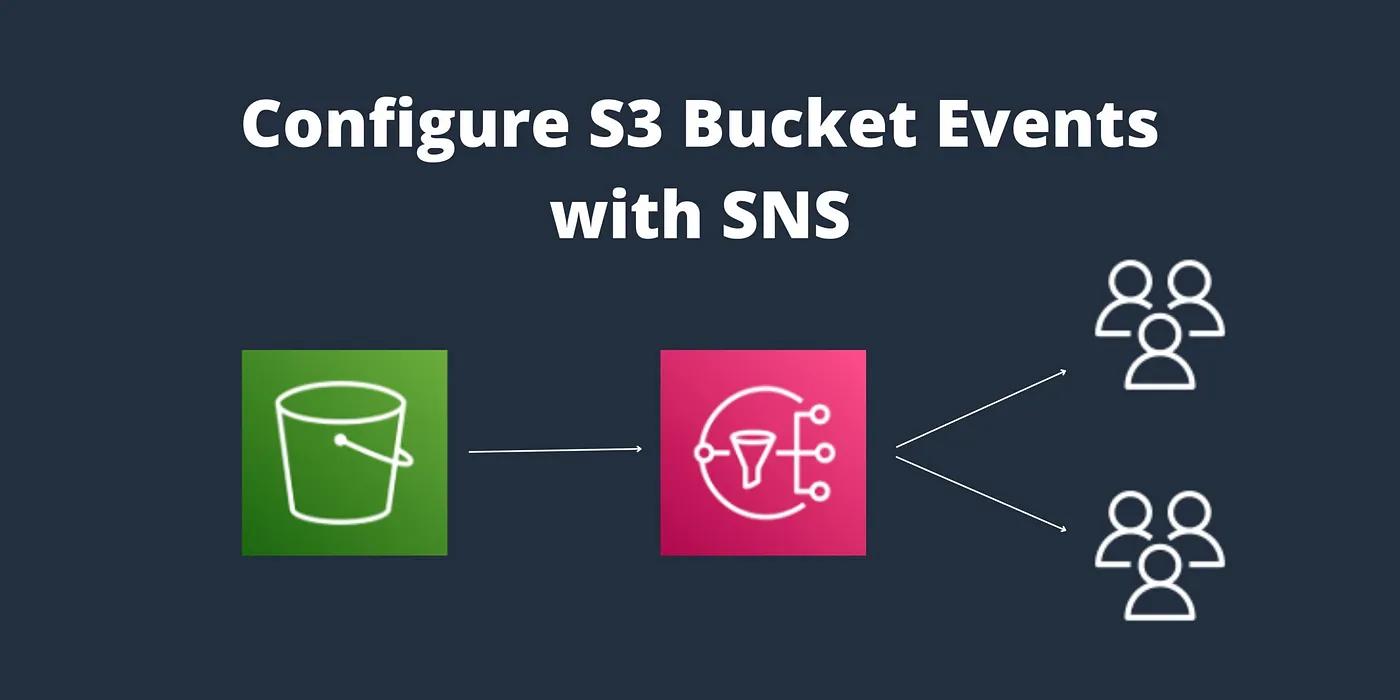
AWS SNS & S3 Events: A Quick Integration Guide
Introduction: In the cloud-driven world of today, creating reliable, event-driven apps requires automation and real-time alerts. The combination of Amazon SNS (Simple Notification Service) and Amazon S3 (Simple Storage Service) is one of the most effective AWS pairings for these kinds of use cases. In this blog, we will walk you through: Whether you’re building a notification system or a fully event-driven architecture, this guide will help you get started with confidence. What is Amazon SNS? Amazon SNS (Simple Notification Service) is a fully managed messaging service that supports the publish/subscribe (pub-sub) communication model. It allows you to send messages to multiple subscribers through different protocols like: You create topics, publish messages to those topics, and then all subscribers receive the messages. What is Amazon S3? Amazon S3 (Simple Storage Service) is an object storage service used to store and retrieve data. It supports S3 Event Notifications; it can automatically trigger a target (like SNS, Lambda, or SQS) when an object is added, removed, or modified in a bucket. By combining S3 with SNS, you can receive instant notifications when specific events happen in the S3. Step by Step procedure for creating and subscribing to SNS Topic and add SNS event for s3 bucket Step1: Creating SNS Topic 3. Under Details: Step2: Subscribing to the Topic via Email 2. Under Details: 3. Click on create subscription.4. You will receive an email confirming the subscription from sns notification. 5. Click on Confirm Subscription Step3: Create an S3 bucket 4. Object ownership: Select ACLs disabled (recommended) option5. Leave all other settings as default and click on Create bucket.6. Select the created bucket and click Copy content on the top. Save the ARN. Step4: Update SNS Topic Access policy { “Version”: “2008-10-17”, “Id”: “__default_policy_ID”, “Statement”: [ { “Sid”: “__default_statement_ID”, “Effect”: “Allow”, “Principal”: { “AWS”: “*” }, “Action”: [ “SNS:GetTopicAttributes”, “SNS:SetTopicAttributes”, “SNS:AddPermission”, “SNS:RemovePermission”, “SNS:DeleteTopic”, “SNS:Subscribe”, “SNS:ListSubscriptionsByTopic”, “SNS:Publish”, “SNS:Receive” ], “Resource”: “<Your_SNS_Topic_ARN>”, “Condition”: { “ArnLike”: { “aws:SourceArn”: “<Your_Bucket_ARN>” } } } ] } 7. Click on Save Changes.8. Now, your SNS topic has access to send notification events based on S3 bucket events Step5: Create an event in S3 Bucket 3. Event name : Enter snsevent4. Event types : Check PUT 5. Under Destination select sns topic and select the existing sns topic which we have created before steps. 6. Click on save changes. Step6: Test the SNS Notification 5. You have successfully received an SNS notification based on the PUT object event in S3 bucket. Related Reading Conclusion AWS S3 and SNS are both strong technologies on their own, but when used together, they maximize the potential of event-driven automation. This combination enables you to react quickly to changes in your data, whether you’re creating scalable workflows, real-time alerts, or alerting systems.Numerous real-world AWS applications make use of this basic yet potent architecture. For further posts about cloud and devops, follow DevOps Horizon.

DevOps vs SRE vs Platform Engineering – What's the Difference?
The Tech Career Confusion: DevOps, SRE, or Platform Engineering? Hey there, tech enthusiasts! If you've been exploring career options in the tech world lately, you've probably come across these three buzzwords: DevOps, SRE, and Platform Engineering. These roles sound similar, have overlapping responsibilities, and all pay pretty well – so what's the actual difference? As someone who's worked with professionals across all three domains, I can tell you the confusion is real. In fact, even job descriptions often blur the lines between these roles! Let's break down each one in simple terms and figure out which might be right for your career path in 2025. DevOps: The OG of Modern IT Operations What Exactly Is DevOps? DevOps isn't just a job title – it's a philosophy, a culture, and a set of practices. The term comes from combining "Development" and "Operations," which pretty much tells you what it's all about: breaking down the traditional silos between developers (who build applications) and operations teams (who run them). The DevOps Focus DevOps focuses primarily on integration and collaboration. The goal? To create a seamless workflow from code development all the way to production deployment and monitoring. A DevOps practitioner works to: Automate repetitive tasks through CI/CD pipelines Implement infrastructure as code (IaC) Foster better communication between teams Speed up software delivery while maintaining quality Create feedback loops for continuous improvement The Day-to-Day Reality of DevOps In a typical day, a DevOps engineer might: Write scripts to automate deployments Configure monitoring tools Troubleshoot pipeline failures Implement security practices (DevSecOps) Work with both developers and operations folks to streamline processes DevOps is the most established of the three roles we're discussing, having been around since around 2009. It remains incredibly relevant today because it addresses fundamental problems in software delivery that still exist in many organizations. SRE: When Reliability Is Everything What Is Site Reliability Engineering? SRE was born at Google when Ben Treynor Sloss defined it as "what happens when a software engineer is tasked with what used to be called operations." It's a more specialized approach that extends DevOps principles with a laser focus on system reliability and performance. The SRE Focus SRE concentrates on system reliability and performance optimization. SREs are obsessed with: Defining and measuring service level objectives (SLOs) Minimizing toil through automation Managing error budgets Incident response and postmortems Capacity planning and performance optimization SRE in Practice A day in the life of an SRE might include: Analyzing system performance metrics Writing automation to handle repetitive operational tasks Creating and refining runbooks for incident response Participating in on-call rotations Conducting blameless postmortems after incidents The key difference between DevOps and SRE? While DevOps aims to balance speed and reliability, SREs are reliability specialists who apply software engineering practices to infrastructure problems. Platform Engineering: The New Kid on the Block What Is Platform Engineering? Platform Engineering emerged as a response to the challenges organizations faced when scaling DevOps practices. It focuses on building internal developer platforms that make it easier for development teams to self-service their infrastructure and deployment needs. The Platform Engineering Focus Platform Engineers are all about creating developer-friendly internal platforms that: Provide self-service capabilities for developers Abstract away infrastructure complexity Standardize deployment processes Integrate tools and services into a cohesive ecosystem Improve developer experience and productivity Platform Engineering in Action A typical Platform Engineer might spend their day: Building and maintaining internal developer portals Creating templates for common infrastructure patterns Integrating various tools into a unified platform Gathering feedback from developers on platform usability Implementing platform features that enable developer self-service Platform Engineering is often described as "DevOps at scale" or the natural evolution of DevOps in larger organizations. While DevOps focuses on the practices, Platform Engineering focuses on the tools and platforms that enable those practices. Side-by-Side Comparison: Spotting the Differences Aspect DevOps SRE Platform Engineering Primary Goal Bridge dev and ops for faster delivery Ensure system reliability Improve developer experience Focus Processes and culture Reliability and performance Internal platforms and tools Metrics Deployment frequency, lead time SLOs, error budgets, MTTR Developer productivity, platform adoption Team Structure Cross-functional Specialized Centralized service team Core Skills Scripting, CI/CD, IaC Software engineering, observability API design, UX, systems thinking Origin Grassroots movement Google Response to DevOps scaling challenges How These Roles Work Together In a well-functioning organization, these roles complement each other beautifully: DevOps establishes the culture and practices that enable fast, reliable software delivery. SRE focuses on making sure the systems remain reliable as delivery speed increases. Platform Engineering builds the tooling and platforms that make DevOps practices accessible to everyone. Think of it as a natural progression: DevOps establishes the principles, SRE specializes in reliability aspects of those principles, and Platform Engineering scales those principles across the organization. Career Paths and Salary Potential Now for the part you're probably most curious about – the career and compensation outlook. DevOps Career Path The DevOps career path is well-established. You might start as a DevOps Engineer, progress to Senior DevOps Engineer, and eventually become a DevOps Architect or Engineering Manager. 2025 Salary Range: $90,000 – $180,000+ depending on experience, location, and company size. SRE Career Path SREs often start as junior SREs or transition from software engineering or operations roles. Career progression includes Senior SRE, Staff SRE, and SRE Manager or Principal SRE. 2025 Salary Range: $100,000 – $200,000+, with Google and similar tech giants typically paying at the higher end. Platform Engineering Career Path This newer career path typically starts with Platform Engineer and progresses to Senior Platform Engineer, Platform Architect, and Director of Platform Engineering. 2025 Salary Range: $95,000 – $190,000+, with the highest compensation typically found in larger enterprises that have significant platform needs. Which Path Is Right for You? Choosing between these career paths depends on your interests and strengths: Choose DevOps if: You enjoy working across different domains and teams You're interested in both development and operations You want a broadly applicable skill set You thrive in environments that value cultural change Choose SRE